


Remixlive - Make Music & Beats
4.44.78K Reviews
App Specs
- Version
- 8.6.3
- Updated On
- License
- Free
- Downloads
- 10,000,000+
- Developer
- MIXVIBES
- Categories
- Music & Audio
- Platform
- Android, iOS
Screenshots
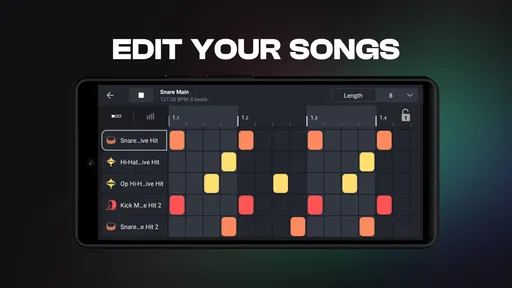
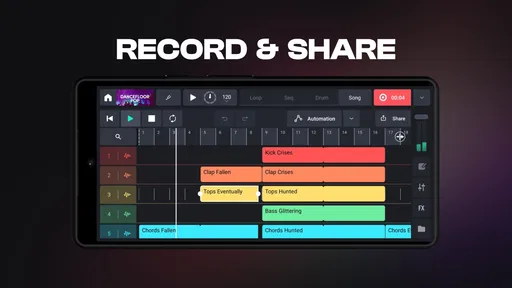
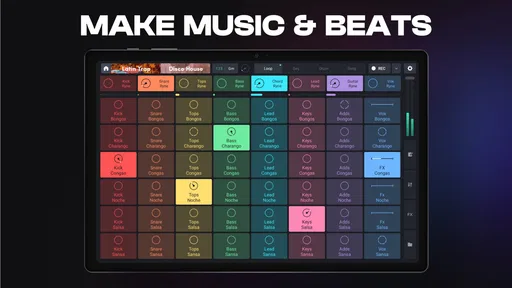

 Analysis by AppCompare
I find Remixlive - Make Music & Beats easiest to understand when I think of it as a shared musical sketchpad rather than a complete recording studio. Someone can tap out a rhythm while another person suggests a loop, then pass the phone or tablet over and let the next person reshape the sound. That low-pressure, take-turns approach suits a household where people are curious about making music but have different levels of experience.
A realistic use might be a quiet evening at home: one person builds a beat, someone else tries a few effects, and the group listens back to a short recorded session. The fun is in experimenting together, not in expecting a polished song after a few taps. I’d keep the device’s volume modest and agree on turns before starting; a grid of responsive pads makes it tempting for everyone to tap at once, which can turn a collaborative idea into noise rather quickly.
One device, several creative styles
The app is more rewarding when each person has a small role. A beginner can trigger loops and learn how sounds fit together, while someone with more experience can shape the mix or connect a MIDI controller. That gives a shared session a natural way to grow without asking every participant to learn the same controls at the same pace.
It is also useful for solo moments between shared sessions. I might start a rhythm while waiting for someone, record a rough idea, and return to it later rather than trying to compose an entire track in one sitting. For a group, short sessions work better than passing around an unfinished project with no plan: decide whether you are exploring sounds, building a beat, or simply recording a playful performance.
Making Music Together and On Your Own
For me, the main household trade-off is that a shared device makes spontaneous music-making easy, but it does not automatically make separate creative work private or organized. Before several people use the same device, it is sensible to agree who can change a session and where finished recordings should go. If one person wants a clean, personal workspace and another wants to experiment freely, separate devices or a clear turn-taking routine may be less frustrating.
I would also set expectations around purchases before handing the app to a younger user. Remixlive is free to download, but it offers in-app purchases, so a family should check the purchase settings on its device and decide who is allowed to approve spending. That is a practical device-level boundary, not a reason to assume the app includes family controls.
What the quick workflow does well
The grid encourages a useful kind of musical thinking: instead of starting with a blank timeline, you can audition a loop, add another sound, and notice how the combination changes the mood. I’d recommend beginning with only a few pads. Keeping the arrangement sparse makes it easier to hear whether a new layer helps, and it gives beginners a manageable way to learn timing before they explore more sounds or effects.
Worth Reading Before You Choose

Flipboard Shows What News Apps Must Do Beyond the Feed

Switching to Android Auto Means Rethinking Your Driving Routine

Google Calendar Makes a Crowded Week Easier to Manage

Ludo King Makes the Most of the Minutes Between Plans

Baby Panda World Brings Quick Play to Modern Phones, but Its Game Library Feels Busy

ESPN’s Live Game View Makes Following Close Games Easier
There is a trade-off to that immediacy. A pad-based performance is excellent for trying combinations and capturing a live idea, but it is not the same experience as carefully arranging every note in a traditional digital audio workstation. If your goal is detailed editing, long-form composition, or a tightly controlled multitrack production process, a dedicated music production app may suit you better. Remixlive makes more sense when playing and experimenting are part of the point.
Age, trust, and choosing the right fit
The app is rated for Everyone, which makes it broadly approachable, but I would still treat a shared tablet like any other device: check its purchase boundaries and decide what sounds and volume are appropriate for the room. A younger child may enjoy triggering pads without understanding how to shape a performance, while an older beginner may get more from trying a simple loop-and-effect routine. Neither needs to be turned into a lesson; a little guidance can make the first session less confusing.
Remixlive is a strong fit for curious beginners, casual beat-makers, and people who like performing with loops. It is less compelling for someone who wants a conventional instrument-learning course or a full desktop-style studio on a phone. The practical question is whether you want an inviting place to play with sound or a precise environment for finishing complex productions; those are different jobs, and this app is better at the first.
In the wider music and audio category, I see it sitting between a simple soundboard and a full production workstation. A basic soundboard can be quicker when all you need is to trigger a few prepared effects, while a traditional DAW offers deeper control but can demand more setup and patience. Remixlive’s appeal is the middle ground: a hands-on way to combine loops, use effects, record a performance, and bring in MIDI hardware when a touchscreen alone is not enough.
That MIDI option is worth thinking about as a workflow choice, not a requirement. I’d first learn the pad layout on the screen, then consider a controller only if tapping the device feels limiting or I want a more physical performance setup. Likewise, I’d treat importing personal sounds as a way to make a session feel distinctive, but keep source files organized beforehand so that choosing material does not interrupt the creative flow.
Getting Started with Remixlive
Alright, so first things first, downloading and setting up Remixlive is a breeze. It’s available on both Android and iOS, so no matter your device, you’re good to go. Once you fire it up, you’re greeted with a clean and intuitive interface. I was pleasantly surprised at how user-friendly it is, even for someone like me who’s just starting out in the music scene.
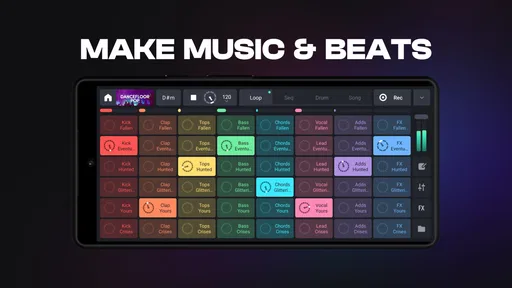
Jumping into the app, you’ll find a grid layout filled with colorful pads. Each pad corresponds to a different sound or loop, and you can mix and match to your heart’s content. It’s all about exploring and having fun with different sounds, which is what makes this app so appealing.
Features That Stand Out
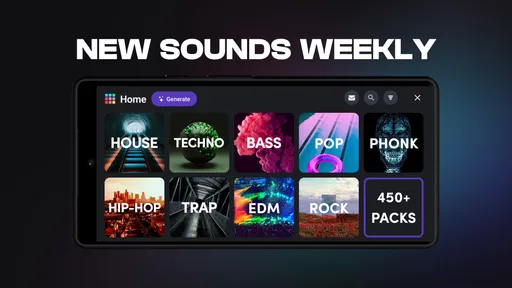
Now, onto the features. One of the coolest things about Remixlive is its sound bank. It’s stocked with a plethora of loops and samples spanning various genres. From hip-hop to electronic, the diversity is impressive. And if you’re feeling creative, you can import your own sounds too!
Another nifty feature is the live recording function. You can record your sessions in real-time, which is perfect for capturing those spontaneous moments of genius. Plus, the app supports MIDI controllers, giving you even more flexibility if you’re serious about your setups.
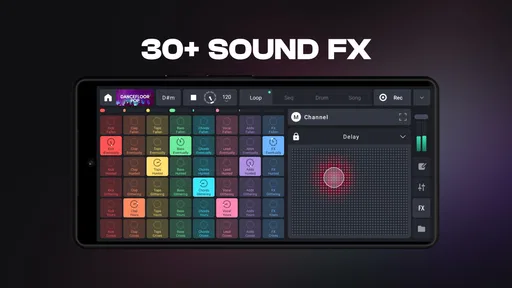
For those who love to tinker, the app offers an array of effects like reverb, delay, and flanger. You can tweak these to give your tracks that extra oomph. The level of customization here is fantastic, and it really allows you to put your personal stamp on your creations.
Making Music on the Go
One of the best parts about Remixlive is its portability. Since it’s on your phone or tablet, you can make music pretty much anywhere. Whether you’re chilling at home or out and about, inspiration can strike, and you’ll be ready to capture it.
Sharing your tracks is also super easy. The app lets you export your creations in various formats, so you can share them with friends or even throw them up on your social media. It’s a great way to showcase your work and get feedback from others.
Final Thoughts
So, what’s the verdict? If you’re looking to dip your toes into music production without a steep learning curve, Remixlive - Make Music & Beats is definitely worth checking out. It’s packed with features that cater to both beginners and more experienced users, all while keeping things fun and accessible.
Whether you’re crafting beats on the subway or layering tracks in your living room, this app offers a versatile platform to unleash your creativity. So go ahead, download it, and start making some awesome music. Who knows, maybe you’ll discover your inner DJ in the process!
Who I’d recommend it to
MIXVIBES has built an app for the Music & Audio crowd that feels approachable without reducing music-making to a one-button novelty. It has a 4.4 average from around 76,000 ratings and more than 10 million installs, which suggests it has found a broad audience, but those figures are less important than whether its loop-first approach matches your habits. I’d try it if you enjoy experimenting by ear and want a quick way to perform combinations rather than enter every note individually.
The current version is 8.6.1, and the app supports devices running Android 6.0 or later. It is free to start, with in-app purchases ranging from $0.99 to $59.99 per item. I’d treat that range as a reason to look carefully at what you choose to unlock rather than assume every sound or option is included at no cost. The app is rated Everyone, but purchase decisions still deserve an adult’s attention on a shared device.
One useful habit is to record a short take early, even if it is only a rough sketch. A live performance can feel satisfying while you are making it, but recording gives you something concrete to review: you can hear whether the transitions work and whether effects are helping or burying the beat. I’d avoid adding several effects at once at first. Changing one thing at a time makes it easier to learn what reverb, delay, or flanger is doing to the sound.
For a beginner, that process also answers a common question: do you need a MIDI controller? No, the pad grid is a reasonable place to start. A controller is a useful next step only if you already know what physical controls would improve your performance. Buying or connecting extra gear before you understand your preferred workflow can add setup without making the music better.
Everyday limits and a sensible household routine
Portability is useful, but a phone is still a small, shared surface. On a commute or in a waiting room, headphones and a brief recording can make experimentation practical; at home, a larger screen may make the pad grid easier for several people to see. I would not treat a casual session as a substitute for a quiet recording setup when clean, carefully edited audio matters. The app’s strength is immediacy, and that same immediacy can make a session feel less precise than a workstation.
Shared use also raises a simple boundary question: whose work is this? If more than one person takes turns on the same device, agree whether a session is a group experiment or one person’s project before changing it. Keeping a note of who made a recording, and exporting a finished take when appropriate, can prevent confusion later. That is a small organizational habit, not a built-in collaboration or account feature.
For a household, I’d make the first session deliberately short: pick a mood, choose a few loops, let each person add one idea, then listen back together. If someone wants to keep developing the result, they can take the next turn with a clearer goal. This avoids the common problem of endless pad tapping and gives a younger user a simple way to participate without needing to understand every production choice.
My overall view is that Remixlive earns its place when you want music creation to feel playful and immediate, whether you are alone or sharing a device with other curious listeners. It is not the option I’d choose for deep track editing, formal music lessons, or a household that expects separate profiles and managed collaboration. But for a free-to-start loop-based tool from MIXVIBES, it gives beginners a friendly entry point and gives more experienced users room to perform, record, and experiment. Used with sensible purchase and turn-taking boundaries, it is an easy app to recommend to a friend who wants to make beats without first building a studio.
Pros
- User-friendly interface for beginners.
- Wide variety of sound packs available.
- Real-time loop editing capabilities.
- Multiple export options for sharing tracks.
- Supports MIDI controllers for enhanced play.
Cons
- In-app purchases can be expensive.
- Limited features in free version.
- Occasional lag on older devices.
- Requires significant storage space.
- Complex for users without music background.
FAQs for Remixlive - Make Music & Beats
What is Remixlive, and how does it work?
Remixlive is a versatile app designed for music enthusiasts and creators, allowing users to create, edit, and perform music using a wide range of samples and loops. The app features an intuitive interface where you can drag and drop sounds, apply effects, and even record your own tracks. It’s suitable for both beginners and experienced producers.
Is Remixlive suitable for beginners in music production?
Yes, Remixlive is highly suitable for beginners due to its user-friendly interface and extensive library of pre-loaded samples and loops. The app provides tutorials and guides to help new users get started, making it an excellent choice for those who want to explore music production without a steep learning curve.
What devices and operating systems are compatible with Remixlive?
Remixlive is compatible with both Android and iOS devices. It requires Android 8.0 or later and iOS 12.0 or later. The app is optimized for smartphones and tablets, ensuring a seamless experience across different screen sizes and operating systems.
Does Remixlive offer in-app purchases or subscriptions?
Yes, Remixlive offers in-app purchases and subscription options. While the app is free to download, users can purchase additional sound packs and effects. A subscription model is also available, which provides access to a broader range of features and an extensive library of premium content.
Can I export my tracks from Remixlive to other platforms?
Yes, Remixlive allows users to export their tracks in various formats, such as WAV or MP3, making it easy to share on different platforms like SoundCloud, YouTube, or social media. This feature ensures that creators can effortlessly distribute their music to a wider audience.


